×

Technische Cookies

Name Purpose Record Duration Provider Type
fe_typo_user This cookie is a standard session cookie of TYPO3. It stores the entered access data when a user logs in for a closed area. duration of the session TYPO3 Association, Sihlbruggstrasse 105, 6340 Baar, Schweiz HTTP
rc::c distinguishes between humans and bots duration of the session Google Ireland Limited, Google Building Gordon House, 4 Barrow St, Dublin, D04 E5W5, Irland HTML
×

Marketing Cookies

Name Purpose Record Duration Provider Type
_ga registers a unique ID which is used to generate statistical data on the user’s website usage 2 years Google Ireland Limited, Google Building Gordon House, 4 Barrow St, Dublin, D04 E5W5, Irland HTTP
_gid registers a unique ID which is used to generate statistical data on the user’s website usage 1 day Google Ireland Limited, Google Building Gordon House, 4 Barrow St, Dublin, D04 E5W5, Irland HTTP
_gat The _gat_UA cookie also contains the identity number (_gat_ <***>) of the Google Analytics account or website to which the cookie refers.  1 day Google Ireland Limited, Google Building Gordon House, 4 Barrow St, Dublin, D04 E5W5, Irland HTTP
_gcl_au is used by Google AdSense for advertising efficiency on web pages 3 months Google Ireland Limited, Google Building Gordon House, 4 Barrow St, Dublin, D04 E5W5, Irland HTTP
r/collect transmits data about the user’s device and behaviour to Google Analytics duration of the session Google Ireland Limited, Google Building Gordon House, 4 Barrow St, Dublin, D04 E5W5, Irland Pixel

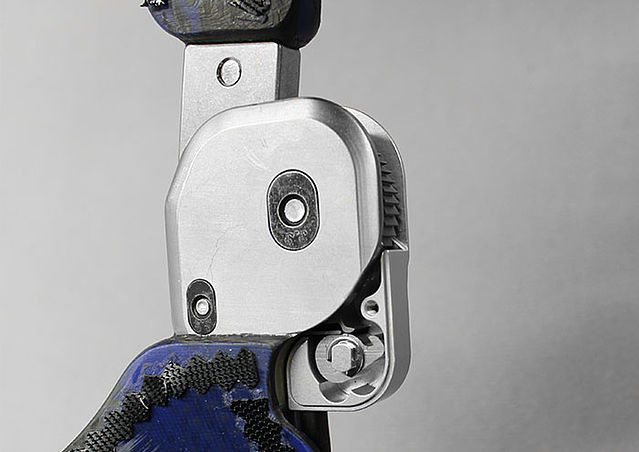
Joint Assembly NEURO MATIC

Using a KAFO with NEURO VARIO-SPRING as an Example

This online tutorial shows the joint assembly of our automatic system knee joint NEURO MATIC connected to our system ankle joints of the NEURO SPRING series:

  • NEURO CLASSIC-SPRING
  • NEURO VARIO-SPRING
  • NEURO VARIO-SPRING 2

By connecting the system knee joint and system ankle joint, the NEURO MATIC system knee joint locks and unlocks mechanically. To choose the most suitable system ankle joint, we recommend using the Orthosis Configurator.

You will find all important information on the adjustment and conversion options of the system joints in the instructions for use.

Furthermore, the NEURO MATIC system knee joint can be converted into a NEURO TRONIC system knee joint, if necessary. For more information, see the online tutorial NEURO TRONIC.

Step 1/33

Clean the system joints. In order to clean the threads in the cover plate, use Super Clean LOCTITE® 7063 to remove any insulating wax residues.

Note: mind the safety data sheet when using Super Clean LOCTITE® 7063.

Step 2/33

In order to connect the system knee joint to the system ankle joint, insert the cable cover into the adaptor screw. Then, place both retaining washers into the adaptor screw and press them in with pliers.

Step 3/33

Mount the adaptor screw with cable cover on the cover plate of the system ankle joint (1). Guide the cable cover through the cable cover conduit and mount the joint (2).

NEURO VARIO-SPRING:
Mount the joint by using the assembly aid for the cover plate.

Step 4/33

Apply spray adhesive on one side of the first sliding washer and adhere it to the NEURO MATIC cover plate with lever. Grease the other side of the sliding washer slightly with orthosis joint grease.

Step 5/33

Mount the toothed ring with sliding bushing to the joint’s upper part.

Step 6/33

The cable cover exceeds the edge of the orthosis. Flush-cut the cable cover with a sharp knife.

Step 7/33

Take another piece of the cable cover. Slightly chamfer one end and turn it into the thread of the cover plate with lever to gain the best possible wire guidance. You need to shorten the other end with a sharp knife until the cable cover protrudes by 1-2cm.

Step 8/33

Grease the sliding surface of the sliding bushing in the axle bore of the toothed ring with orthosis joint grease.

Note: make sure that no grease enters the toothing of the locking pawl and the toothed ring.

Step 9/33

Put the bearing nut for the locking pawl into the intended opening on the joint’s lower part. Ensure that the bearing nut is in the correct position. Mount the locking pawl.

Step 10/33

Grease the axle bore of the joint axis and the sliding surfaces of the bearing nut with orthosis joint grease.

Step 11/33

Grease the second sliding washer slightly on both sides with orthosis joint grease.

Step 12/33

Put the bearing nut for the joint axis into the intended opening on the joint’s lower part. Ensure that the bearing nut is in the correct position. Place the second sliding washer on the bearing nut

Step 13/33

Mount the joint's upper part and, afterwards, the cover plate.

Note: the lever should be set to A (Auto).

Step 14/33

Tighten the screws with the corresponding torque.

Note: you will find information about the torque (Nm) on the system joint’s cover plate or in the instructions for use.

Step 15/33

If you have damaged a sliding washer while mounting the cover plate (you would hear a soft cracking), remove the particles and place a new sliding washer.

Step 16/33

Make sure that the bearing nuts are fully inserted in the intended openings.

Note: the delivered screws always match the respective system joint. A potential discrepancy between the length of the screws and the threads of the bearing nuts has no effect on the load capacity of the system joint.

Step 17/33

Set the lever to F (Free) and keep it this way for the following steps. At a system knee joint with a system width of 16mm, the hardened laminate must be milled at the lever area first (see arrow).

Step 18/33

Check if the system joint moves freely. Bring the system joint in extension. In order to check the flexion, hold the orthosis in a horizontal position and then let go of the thigh shell. The thigh shell should smoothly fall downward up to the maximum possible flexion angle. If the system joint does not move freely, mount the next thinner sliding washer, repeat all steps from step 11 onwards and check again.

Note: at a bilateral orthosis, only check one system joint at a time.

Step 19/33

Check if the system joint moves without lateral play. Secure the lower leg shell and check whether the thigh shell can be moved in varus-valgus direction. If the system joint moves with lateral play, make sure that the sliding bushing is mounted correctly. If there is lateral play, even though the sliding bushing is mounted correctly, you need to mount the next thicker sliding washer. Repeat all steps from step 11 onwards and check again.

Note: at a bilateral orthosis, only check one system joint at a time.

Step 20/33

Check the mobility of the locking pawl. Set the lever to A. Turn the orthosis until the foot piece points upwards. By doing so, the locking pawl falls into the toothing. Now, it should no longer be possible to flex the system knee joint. If the system knee joint can still be flexed, check the joint assembly and remove, if there are any, remaining resin residues and surplus grease from the system knee joint. Check again.

Note: during the following steps, the lever remains set to A.

Step 21/33

Check the orthosis’ alignment on the workbench. Make adjustments, if necessary.

Note: please note that the angle between lower leg and foot piece determines the length of the wire. If this angle changes, the length of the wire will have to be adapted accordingly. In order to avoid this, check the alignment of the orthosis before shortening the wire.

Step 22/33

Demount the NEURO MATIC system knee joint again.

NEURO VARIO-SPRING:
Demount the cover plate of the system ankle joint and pull the cable cover out of the cable cover conduit.

NEURO CLASSIC-SPRING, NEURO VARIO-SPRING 2:
Demount the adaptor screw and pull the cable cover out of the cable cover conduit.

Step 23/33

Degrease and roughen the end of the wire (1). Set a drop of low-viscous fast-acting adhesive on the bore of the pin (2). Guide the wire through the bore into the pin. Quickly move the wire up and down several times to spread the fast-acting adhesive evenly and to remove air from the bore. Insert the wire into the bore until no space is left at the bottom and let the fast-acting adhesive harden (3).

Note: mind the safety data sheet when using fast-acting adhesive.

Step 24/33

Important! The wire must be pushed through to the very end.
Adhesive below the wire could give way under the shear load of the system joint. Thus, the wire would slide downwards and the joint would no longer lock accurately.

Step 25/33

Slide the coil spring over the wire onto the pin. Guide the pin with coil spring and wire through the adaptor screw into the cable cover. Attach the adaptor screw to the cover plate by inserting the ball, and then the pin with coil spring and wire, into the spring duct. To finish, you need to tighten the adaptor screw.

Step 26/33

Guide the cable cover with wire through the cable cover conduit again.

NEURO VARIO-SPRING 2 and NEURO CLASSIC-SPRING:
Screw the adaptor screw into the screw unit of the system ankle joints’ posterior spring unit.

NEURO VARIO-SPRING and NEURO VARIO-SPRING 2:
Mount the system ankle joint by using the assembly aid for cover plate.

Step 27/33

Important! Please note that the angle between lower leg and foot piece determines the length of the wire. This is why the orthosis’ alignment is checked before this step. Before you continue, make sure that there were no changes.

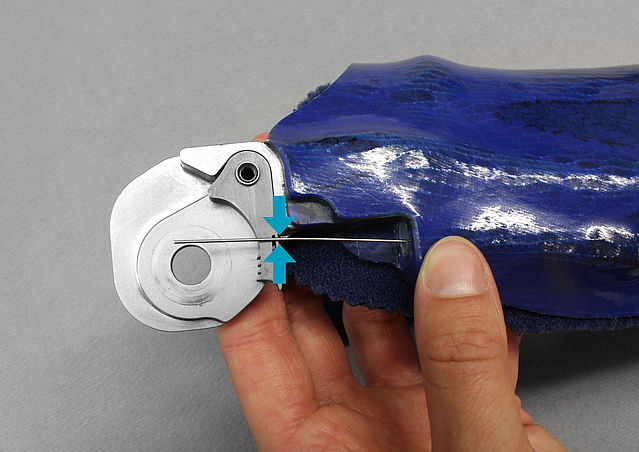
The wire should be flush with the locking pawl of the NEURO MATIC system knee joint. Mark the crossing point of the wire and the locking pawl and cut the wire at the marking (lower edge of the locking pawl).

Step 28/33

Mount the joint again. While mounting the cover plate, carefully guide the wire from below through the cable cover at the cover plate.

Note: the lever should be set to A (Auto).

Step 29/33

Check the length of the wire. To do so, put the orthosis in a shoe to which the orthosis is adjusted. Move the system ankle joint until the dorsiflexion stop is reached. In this position, you should be able to bring the system knee joint in extension/flexion. If this is not the case, the wire is too long. Shorten the wire accordingly.

Step 30/33

Bring the system ankle joint in plantar flexion. The locking pawl can now reach the locking position via the wire. Therefore, it should no longer be possible to flex the system knee joint. If this is still the case, the wire is too short. Replace the wire with the delivered second wire. Repeat all steps starting at step 23 and check again.

Step 31/33

Secure the axle screw and the screw of the locking pawl with LOCTITE® 243 medium strength and the corresponding torque. Let the adhesive harden (final strength after approx. 24 hours).

Note: mind the safety data sheet when using LOCTITE® 243 medium strength.

Step 32/33

Mount the small cover plate by tightening the axle screw by hand.

Step 33/33

Press the extension stop damper into the intended bore. Make sure that the system knee joint can easily reach the extension stop via the step lock gearing and come into full extension.

Last Update: 14 October 2022


×

Technische Cookies

Name Purpose Record Duration Provider Type
fe_typo_user This cookie is a standard session cookie of TYPO3. It stores the entered access data when a user logs in for a closed area. duration of the session TYPO3 Association, Sihlbruggstrasse 105, 6340 Baar, Schweiz HTTP
rc::c distinguishes between humans and bots duration of the session Google Ireland Limited, Google Building Gordon House, 4 Barrow St, Dublin, D04 E5W5, Irland HTML
×

Marketing Cookies

Name Purpose Record Duration Provider Type
_ga registers a unique ID which is used to generate statistical data on the user’s website usage 2 years Google Ireland Limited, Google Building Gordon House, 4 Barrow St, Dublin, D04 E5W5, Irland HTTP
_gid registers a unique ID which is used to generate statistical data on the user’s website usage 1 day Google Ireland Limited, Google Building Gordon House, 4 Barrow St, Dublin, D04 E5W5, Irland HTTP
_gat The _gat_UA cookie also contains the identity number (_gat_ <***>) of the Google Analytics account or website to which the cookie refers.  1 day Google Ireland Limited, Google Building Gordon House, 4 Barrow St, Dublin, D04 E5W5, Irland HTTP
_gcl_au is used by Google AdSense for advertising efficiency on web pages 3 months Google Ireland Limited, Google Building Gordon House, 4 Barrow St, Dublin, D04 E5W5, Irland HTTP
r/collect transmits data about the user’s device and behaviour to Google Analytics duration of the session Google Ireland Limited, Google Building Gordon House, 4 Barrow St, Dublin, D04 E5W5, Irland Pixel